How To Reset Your Kitchenaid Oven After Power Outage
Resetting your KitchenAid oven after a power outage is easier than you think. This guide walks you through every step, from basic reset methods to troubleshooting common problems. You will learn how to restore your oven settings, fix error codes, and prevent future damage. Whether your oven won’t heat or the display is acting up, we have you covered. Keep reading to get your KitchenAid oven running smoothly again in no time.
Key Takeaways
- Simple Reset Works Most of the Time: A basic power cycle or control panel reset resolves most post-outage issues with your KitchenAid oven.
- Check the Circuit Breaker First: Always verify your home’s electrical panel before attempting any oven reset steps.
- Error Codes Tell a Story: Understanding what your oven display is saying helps you troubleshoot faster and smarter.
- Surge Protection Matters: Using a surge protector can prevent damage to your KitchenAid appliance during future power outages.
- Know When to Call for Help: Some issues, like a blown thermal fuse or damaged control board, need professional attention.
- Prevention Beats Cure: Regular maintenance and smart electrical habits keep your oven healthy long-term.
📑 Table of Contents
Why Power Outages Affect Your KitchenAid Oven
A power outage can throw your entire kitchen into chaos. Lights go off. The fridge stops humming. And your KitchenAid oven? It just goes dark. But when the power comes back, things don’t always go back to normal. Your oven might not turn on, display strange codes, or simply refuse to heat. This is more common than you might think.
When electricity flows through your oven, the digital controls, sensors, and heating elements all rely on a steady supply. A sudden interruption can confuse the electronic control board. Think of it like your phone freezing when an app crashes. Sometimes a quick restart fixes everything. Other times, you need a few more steps. Either way, knowing how to reset your KitchenAid oven after a power outage saves you time, money, and a lot of frustration.
What Happens Inside Your Oven During a Power Outage
Your KitchenAid oven uses a digital control board to manage every function. This board controls the temperature, the timer, the display, and the heating elements. When power drops suddenly, the board loses its current settings. The oven clock might reset to midnight. Saved cooking programs can disappear. In some cases, the oven enters a lockout mode as a safety feature.
The bake element and broil element also feel the impact. These parts use high amounts of electricity. A power surge when the grid comes back can stress them. The thermal fuse, a small safety device inside your oven, might blow if the surge is strong enough. This is why it’s smart to check more than just the control panel after an outage.
Common Symptoms After a Power Outage
Not sure if your oven needs a reset? Watch for these signs:
- The oven display is blank or flickering.
- The clock shows the wrong time or resets randomly.
- The oven won’t start when you press the buttons.
- Error codes appear on the screen that you have never seen before.
- The oven heats unevenly or not at all.
- The self-clean cycle won’t start or stops mid-cycle.
- The oven door lock is stuck in the engaged position.
If you notice any of these problems, don’t panic. Most of the time, a simple reset fixes everything. Let’s walk through exactly how to do it.
How To Reset Your KitchenAid Oven Step by Step
Resetting your KitchenAid oven after a power outage is a straightforward process. You do not need any special tools or technical skills. Just follow these steps carefully and your oven should be back in business soon.
The Basic Power Cycle Reset
This is the first and most important step. The power cycle clears any temporary errors in the oven’s electronic control board. Here is what to do:
- Turn off your oven. If the display is still working, press the Off button. If not, move to the next step.
- Go to your home’s circuit breaker panel. Find the breaker that controls your kitchen oven circuit.
- Switch the breaker to the Off position. Wait at least 30 seconds. This gives the oven’s capacitors time to fully discharge.
- Switch the breaker back to the On position. Wait for the oven to power up fully.
- Check the display screen. The clock should appear. If it does, you have successfully completed the reset.
- Set the clock and try a simple bake cycle. Set the oven to 350 degrees Fahrenheit and let it preheat. This tests whether the heating elements are working correctly.
For most KitchenAid models, this basic reset solves the problem. The oven control board gets a fresh start and clears any temporary glitches caused by the power interruption.
The Control Panel Reset Method
If the power cycle did not work, try the control panel reset. This method works well when the oven display is active but the oven is not responding to commands. Here is what to do:
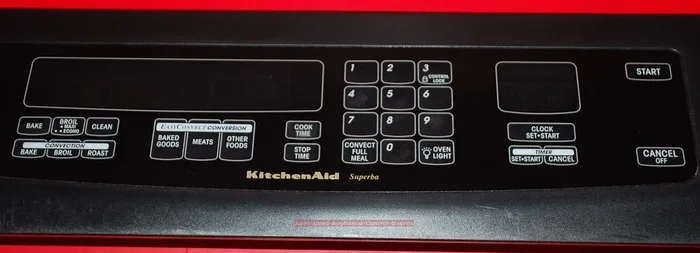
- Press and hold the Bake button for 5 seconds. This forces the oven into a reset state on many KitchenAid models.
- Press and hold the Broil Hi-Lo button for 5 seconds. This is another common reset combination.
- Try pressing the Off button, then turning the oven dial to Off. Wait 2 minutes, then turn it back on.
- For models with a dial, turn the oven control to the Off position. Wait 60 seconds. Turn it back to Bake. Set your desired temperature.
Different KitchenAid oven models have slightly different reset sequences. If you are not sure which method to use, check your owner’s manual. The manual will list the exact reset procedure for your specific model number. You can also find this information on the KitchenAid website by entering your model number in the search bar.
Resetting the Oven Clock and Settings
After a power outage, your oven clock will likely need to be reset. This is one of the most common post-outage issues. A wrong clock setting can also interfere with delayed bake features and timer functions.
To reset the clock, press the Clock button. Use the number pad or the arrow buttons to set the correct time. Press the Clock button again to confirm. Some newer KitchenAid models let you sync the clock with your Wi-Fi network. This is a handy feature if your oven is a smart model connected to the KitchenAid app.
Also check your oven settings. The self-clean lock, the child lock, and any saved cooking programs may have reset to default. Go through each setting and adjust them back to your preferences. This small step makes a big difference in how smoothly your oven operates afterward.
Troubleshooting Common Issues After a Power Outage
Sometimes a reset is not enough. Your KitchenAid oven might still act up even after you have followed all the steps. Here are the most common issues and what you can do about them.
The Oven Is Not Heating Up
If your oven resets but does not heat, the problem could be with the heating elements. The bake element sits at the bottom of the oven cavity. The broil element is at the top. Either one can fail after a power surge.
To check the bake element, look at it closely. A healthy element glows red when the oven is heating. If you see any breaks, blistering, or spots where the element is damaged, it needs to be replaced. You can test it with a multimeter to check for continuity. A lack of continuity means the element is burned out and must be replaced.
The broil element works the same way. Check it for visible damage. If both elements look fine, the problem might be with the oven control board or the temperature sensor. These parts are more complex to replace and may require professional help.
Error Codes on the Display Screen
Error codes are your oven’s way of telling you something is wrong. After a power outage, certain codes are very common. Here are a few you might see:
- F1 or F2: This usually points to a control board issue. Try the reset steps again. If the code returns, the control board may need replacing.
- F3 or F4: This relates to the oven temperature sensor. The sensor might have shifted during the outage or lost its calibration.
- F5 or F6: These codes often indicate a problem with the door lock mechanism, especially after a self-clean cycle interruption.
- PF: This means Power Failure. Your oven has detected the outage and paused all operations. A reset should clear this code.
- E0 or E1: These are communication errors between the control board and the display. A full power cycle usually fixes this.
Write down the exact code and look it up in your owner’s manual. The manual will give you a specific fix for each code. If the code keeps coming back after a reset, it is time to dig deeper or call a technician.
The Oven Door Lock Is Stuck
Many KitchenAid ovens have a self-clean door lock. If the power went out during a self-clean cycle, the lock might stay engaged. This is a safety feature designed to prevent burns. But it is very annoying when you just want to open the door.
Try resetting the oven using the power cycle method. Once the oven powers back on, press the Cancel button. Wait 30 seconds. The lock should release. If it does not, try turning the oven off at the circuit breaker, waiting 2 minutes, and turning it back on. The lock mechanism should reset with the full power cycle.
When To Call a Professional for Help
Not every problem can be fixed with a simple reset. Knowing when to call a professional saves you from making things worse. Here are the signs that your KitchenAid oven needs expert attention.
Signs of Serious Internal Damage
Be cautious if you notice any of these warning signs:
- You smell burning plastic or ozone near the oven after the power returns.
- You see scorch marks or discoloration on the oven interior or control panel.
- The oven makes unusual buzzing or clicking sounds that do not stop.
- The circuit breaker trips again immediately after you turn the oven on.
- The oven display is completely dead and does not respond to any button presses.
- The bake element or broil element is visibly damaged or broken.
These symptoms suggest deeper electrical damage. A blown thermal fuse, a damaged control board, or wiring issues could be the cause. Trying to fix these yourself can be dangerous. Always call a qualified appliance repair technician for these problems.
Warranty and Repair Options
Before you call for help, check your warranty status. Most KitchenAid ovens come with a limited warranty that covers parts and labor for the first year. The oven cavity and sealed components may have a longer warranty period. If your oven is still under warranty, contact KitchenAid directly. They can send a certified technician to diagnose and fix the problem at no cost to you.
If your warranty has expired, you still have options. Many local appliance repair shops offer free estimates. You can also search for authorized KitchenAid service centers in your area. These centers use genuine KitchenAid parts and trained technicians. That means your oven gets the best care possible. Always ask for a written estimate before any repair work begins.
Preventing Future Power Outage Damage
Resetting your oven after an outage is one thing. Preventing damage in the first place is even better. A few simple habits can protect your KitchenAid oven and extend its lifespan significantly.
Use a Surge Protector
Power surges are the real enemy of your oven. When the power comes back after an outage, the initial surge of electricity can fry sensitive electronic components. A good surge protector absorbs that extra voltage and keeps it from reaching your appliance.
Look for a surge protector with a high joule rating. A rating of 1000 joules or more offers solid protection. Plug your oven directly into the surge protector. Do not chain multiple power strips together. And make sure the surge protector is rated for the wattage your oven draws. Most KitchenAid ovens need a dedicated 240-volt circuit, so check the specifications carefully.
Unplug During Severe Storms
If you live in an area prone to electrical storms or frequent outages, consider unplugging your oven during severe weather. This is the most foolproof way to protect your appliance. Lightning strikes and grid fluctuations can cause devastating power surges. Unplugging removes that risk entirely.
This tip applies to all your kitchen appliances, not just the oven. Coffee makers, microwaves, and dishwashers can all suffer damage from power surges. A few minutes of unplugging can save you hundreds of dollars in repair costs.
Regular Maintenance Keeps Things Running
A well-maintained oven handles power interruptions better than a neglected one. Here are some simple maintenance habits:
- Clean your oven regularly to prevent grease buildup near heating elements.
- Check the door seal for gaps or wear. A good seal helps the oven heat efficiently.
- Test your oven temperature with an independent oven thermometer. If the temperature is off by more than 25 degrees, the sensor might need recalibrating.
- Inspect the bake element and broil element every few months for signs of wear.
- Keep the oven vents clear and unobstructed for proper airflow.
These small habits add up over time. They keep your KitchenAid oven performing at its best and reduce the risk of damage from unexpected power events.
Final Thoughts on Resetting Your KitchenAid Oven After a Power Outage
A power outage can disrupt your kitchen routine, but it does not have to ruin your oven. The key is to stay calm and follow the steps in the right order. Start with a simple power cycle reset. Check the circuit breaker. Reset the control panel if needed. Address any error codes or heating issues that persist. And when in doubt, call a professional.
Most KitchenAid ovens recover fully from a power outage with just a reset. The digital controls are designed to handle temporary interruptions. By following the steps in this guide, you give your oven the best chance to bounce back quickly.
Remember, prevention is your best long-term strategy. A surge protector, a few maintenance habits, and a little awareness go a long way. Your KitchenAid oven is a valuable investment. Taking care of it after a power outage ensures it keeps serving you well for years to come.
Now that you know exactly how to reset your KitchenAid oven after a power outage, you are ready for whatever comes your way. The next time the lights go out, you will not worry. You will know exactly what to do.
Frequently Asked Questions
How long should I wait after turning off the breaker before turning it back on?
Wait at least 30 seconds after switching the breaker to the Off position. This gives the oven’s electronic control board enough time to fully discharge any residual power. A full 60 seconds is even better if you have the patience. This pause is what allows the reset to clear any temporary glitches in the system.
Will resetting my KitchenAid oven delete my saved cooking settings?
Yes, a full power cycle reset can clear saved cooking programs and custom settings. The oven clock will also need to be reset after the power comes back. This is normal and expected. You will just need to re-enter your preferred settings once the oven is back on and running properly.
What should I do if the oven error code keeps coming back after a reset?
If an error code returns after you reset the oven, it signals a deeper problem that a simple reset cannot fix. Write down the exact code and look it up in your owner’s manual for model-specific guidance. If the code persists, contact a certified KitchenAid technician to diagnose and repair the underlying issue safely.
Can a power outage damage the oven control board permanently?
Yes, a severe power surge during an outage can damage the control board permanently. Signs of a damaged board include blank displays, unresponsive buttons, or repeated error codes that do not clear after a reset. If you suspect board damage, stop using the oven and call a professional for assessment and repair.
Do I need any special tools to reset my KitchenAid oven after a power outage?
No special tools are needed for a basic reset. You only need access to your home’s circuit breaker panel and a few minutes of time. However, if you need to test heating elements or the temperature sensor, a basic multimeter can be helpful. For most homeowners, the reset itself requires nothing more than pressing a few buttons.
How can I protect my KitchenAid oven from future power outages?
The best protection is a quality surge protector rated for your oven’s electrical requirements. You can also unplug the oven during severe storms or known outage periods. Regular maintenance, like checking the door seal and cleaning the heating elements, helps your oven handle electrical disruptions more gracefully and stay in top shape longer.
=== CONCLUSION ===
Resetting your KitchenAid oven after a power outage does not have to be stressful. With the right steps and a little patience, you can get your oven back to working order quickly. Start with the basic power cycle reset. Move to the control panel reset if needed. Troubleshoot any persistent issues like error codes or heating problems. And always know when to call in a professional for serious damage.
The most important takeaway is this: most post-outage oven issues resolve with a simple reset. Your KitchenAid oven is designed to handle temporary power interruptions. Give it the fresh start it needs, and it will usually bounce back without any problem.
Take action today. Check your oven settings, reset the clock, and test a simple bake cycle. A little effort now saves you from bigger headaches later. Your KitchenAid oven will thank you for it.