How To Use Zline Oven A Complete Step By Step Guide
Our guide walks you through every step of using your Zline oven with confidence. You will learn how to set the temperature, choose the right cooking mode, and keep your oven running smoothly for years. Whether you own a Zline range oven or a Zline double oven, this guide has you covered with clear, simple instructions.
Owning a Zline oven is a fantastic addition to any kitchen. These built-in ovens bring professional-grade performance right into your home. But if you just unboxed yours, you might feel a little overwhelmed.
Do not worry. This guide will walk you through everything step by step. We will show you exactly how to use Zline oven models with ease and confidence. By the end, you will be cooking meals like a seasoned chef.
Whether you have a Zline range oven or a Zline double oven, the basics stay the same. We will cover setup, daily use, cooking modes, cleaning, and troubleshooting. Every section is designed to be simple and practical. No jargon. No confusing manuals. Just clear instructions you can follow right away.
Let us start with the very first thing you need to know before you even turn on the oven.
Key Takeaways
- Master the Basics: Understand your Zline oven control panel and get comfortable with all the essential settings.
- Preheat Like a Pro: Learn the correct preheating steps for even cooking and better results every time.
- Use the Right Cooking Modes: Discover bake, broil, convection, and self-cleaning modes for different meals.
- Keep It Clean: Follow simple cleaning and maintenance tips to extend the life of your Zline kitchen appliance.
- Troubleshoot Easily: Handle common issues like uneven heating or error codes without calling a technician.
- Safety First: Practice safe oven use with tips on rack positioning, ventilation, and child safety.
📑 Table of Contents
Getting to Know Your Zline Oven
Understanding the Control Panel
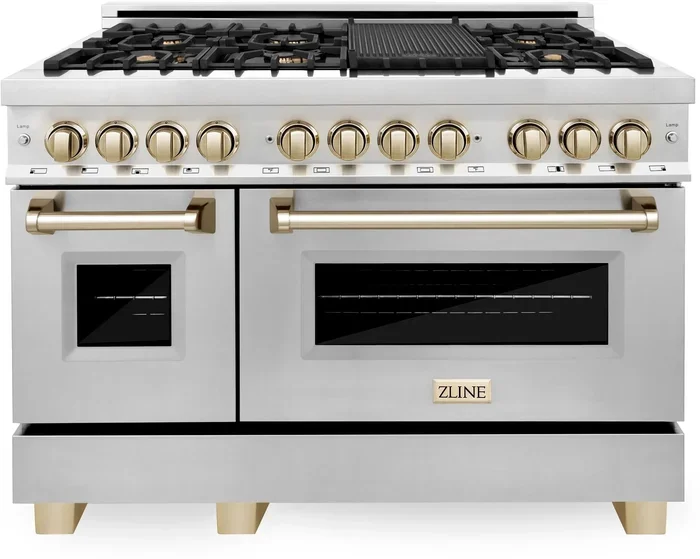
The control panel is the brain of your Zline range oven. It is where you set the temperature, choose the mode, and set the timer. Most Zline models feature a digital display with touch buttons. Some older models may use dial knobs instead.
Here is what you will typically find on the panel:
- Temperature display — shows the current or set temperature
- Mode selector — lets you choose bake, broil, convection, or self-clean
- Timer controls — set cooking time or a countdown
- Power button — turns the oven on and off
- Child lock — keeps little ones safe from accidental burns
Take a few minutes to explore your specific model. Look at the labels on each button. This small step makes a big difference when you are in the middle of cooking.
Zline Oven Installation Tips
Before you start cooking, make sure your Zline oven is installed correctly. A proper setup affects performance and safety. If you bought a built-in Zline double oven, you may need professional installation.
Here are a few quick tips:
- Ensure the oven is level on a flat surface
- Check that the electrical outlet matches the voltage requirements
- Leave enough ventilation space around the unit
- Read the Zline oven manual for model-specific instructions
- Do not install the oven near heat sources or in tight cabinets
Once the installation is done, you are ready to move on to the fun part — using the oven.
How To Preheat Your Zline Oven
Preheating is one of the most important steps in how to use Zline oven properly. Skipping this step leads to uneven cooking and longer bake times. Always preheat before placing food inside.
Here is the simple process:
- Press the power button to turn on the oven
- Select your desired mode — usually “bake” for most recipes
- Set the temperature using the temperature controls
- Wait for the preheat signal — most Zline ovens beep or show a light
- Place your food inside once the signal sounds
A good rule of thumb is to preheat for at least 10 to 15 minutes. This gives the oven walls and racks time to reach the right temperature. For Zline convection oven models, the preheating time may be slightly shorter because of the fan system.
Quick Tip: If you are unsure whether your oven is fully preheated, use an oven thermometer. This small tool takes the guesswork out of the process.
Cooking Modes and How To Use Them
Your Zline oven comes with multiple cooking modes. Each mode serves a different purpose. Understanding them helps you get the best results from every meal.
Bake Mode
Bake mode is the most commonly used setting. It uses the bottom heating element to create even, gentle heat. Use this mode for cakes, cookies, casseroles, and bread.
When you select bake mode on your Zline electric oven, the heat rises from the bottom element. This creates a natural circulation that cooks food evenly. Most recipes call for bake mode as the default setting.
Broil Mode
Broil mode uses the top heating element for high, direct heat. It is perfect for browning the top of dishes, melting cheese, or getting a crispy finish on meats.
Keep a close eye on food in broil mode. The intense heat can cause burning very quickly. Use a shallow pan and stay near the oven during broiling.
Convection Mode
Convection mode adds a fan and exhaust system to the baking process. This circulates hot air around the food for faster, more even cooking.
Many home cooks prefer their Zline convection oven for roasting vegetables, poultry, and baked goods. The fan helps eliminate hot spots. You can also lower the temperature by about 25 degrees Fahrenheit compared to regular bake mode.
Self-Clean Mode
The self-clean mode uses very high heat to burn off food residue inside the oven. It is a huge time-saver for Zline oven cleaning.
Here is how to use it safely:
- Remove all racks, pans, and foil from the oven
- Wipe out any large food particles
- Close the door securely
- Select self-clean and set the time
- Let the cycle run — it usually takes 2 to 4 hours
- Once cooled, wipe away the ash with a damp cloth
Always ventilate your kitchen during self-clean cycles. The process produces smoke and odors, which is completely normal.
Temperature Settings and Calibration
Getting the temperature right is key to great cooking. Sometimes a Zline oven may run a few degrees hot or cold. This is where calibration comes in.
How To Check Your Oven Temperature
Buy an inexpensive oven thermometer and place it on the center rack. Preheat to 350 degrees Fahrenheit and wait for the preheat signal. Then compare the thermometer reading with the display.
If the readings differ by more than 15 degrees, you may need to recalibrate. Check your Zline oven manual for the calibration procedure. Most models allow you to adjust the temperature offset through the control panel.
Common Temperature Mistakes
- Opening the door too often — this drops the temperature significantly
- Placing foil on the bottom rack — this blocks heat flow
- Overcrowding the oven — this prevents proper air circulation
- Ignoring the preheat signal — food goes in too early
Avoid these mistakes and your Zline oven temperature settings will deliver consistent, reliable results every time.
Rack Positioning and Cooking Tips
Where you place the oven rack affects how your food cooks. This is one of the simplest yet most overlooked parts of how to use Zline oven effectively.
Here is a quick guide to rack placement:
- Top rack: Best for broiling and getting a crispy top
- Center rack: The default position for most baking and roasting
- Bottom rack: Ideal for pizzas and dishes that need a crispy bottom
- Lower third: Great for bread and pastries that need bottom heat
Always use oven-safe pans and bakeware. Glass, metal, and ceramic work well in Zline ovens. Avoid plastic or paper items unless the manual specifically says they are safe.
Quick Tip: Rotate your pans halfway through cooking. This simple trick helps food cook evenly, especially in larger Zline double oven units.
Cleaning and Maintenance
Keeping your Zline oven clean improves performance and extends its lifespan. A clean oven also cooks food more evenly and smells better.
Daily Cleaning Habits
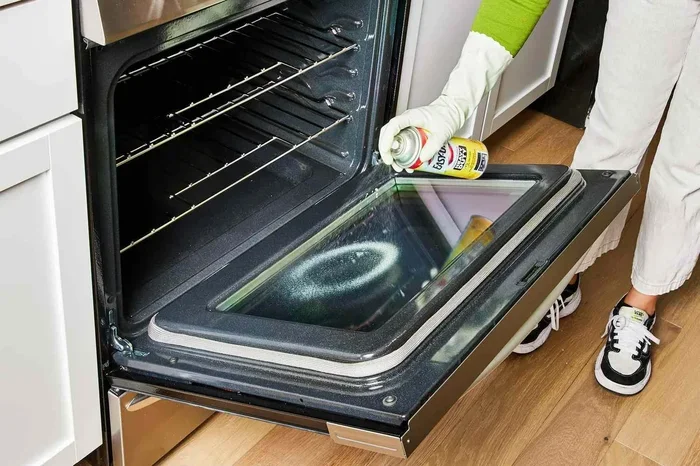
Wipe up spills as soon as the oven cools down. Use a damp cloth with mild soap for the interior. Avoid harsh abrasive cleaners on the oven walls and door glass.
For the racks, remove them and soak them in warm soapy water. Scrub gently with a non-abrasive sponge. This prevents grease buildup and keeps the racks gliding smoothly.
Monthly Maintenance Checklist
- Clean the oven interior with a gentle cleaner
- Wipe the door seal with a damp cloth
- Check the control panel for any sticky buttons
- Inspect the oven light and replace if needed
- Run a short self-clean cycle if needed
Following these simple steps keeps your Zline kitchen appliance in top shape. Maintenance is much easier than repair — and a lot cheaper too.
Troubleshooting Common Issues
Even the best ovens sometimes have issues. Here are a few common problems and how to fix them when using your Zline oven.
Oven Not Heating Up
Check that the oven is plugged in and the circuit breaker has not tripped. Make sure the door closes properly — many Zline models will not heat if the door is open or misaligned.
Uneven Cooking Results
Uneven heat often means the oven needs recalibration. Check the racks to make sure they are not blocking airflow. Avoid opening the door too frequently during cooking.
Error Codes on the Display
If your Zline oven shows an error code, do not panic. Refer to the manual for a list of codes and their meanings. Most error codes relate to temperature sensors or door switches. Resetting the oven by turning it off and back on often resolves the issue.
Strange Noises During Operation
A slight humming sound during convection mode is normal. The fan is simply doing its job. If you hear loud rattling or grinding, check for loose racks or pans inside the oven. Remove any foreign objects and run the oven again.
Most troubleshooting issues can be solved at home without calling a service technician. But if problems persist, contact Zline customer support for professional help.
Safety Best Practices
Safety should always come first when using any kitchen appliance. Here are essential safety tips for your Zline oven.
- Never leave the oven unattended during long cooking sessions
- Use oven mitts when handling hot racks and pans
- Keep flammable items away from the oven
- Enable the child lock feature if you have young children
- Ensure proper ventilation in the kitchen
- Do not use the oven to heat your home
- Unplug the oven before cleaning or performing any maintenance
Following these practices keeps your family safe and your Zline gas oven or electric oven running smoothly for many years.
Conclusion
Learning how to use Zline oven does not have to be complicated. With the right knowledge, you can confidently preheat, cook, and clean your oven every single day. From understanding the control panel to mastering different cooking modes, this guide has covered everything you need.
Remember to preheat before every cook, use the right rack position, and keep your oven clean. These small habits lead to big improvements in your cooking results. Your Zline oven is a powerful kitchen appliance — now you know exactly how to get the best out of it.
Start applying these tips today. Try a new recipe, experiment with convection mode, and enjoy the process. The more you use your Zline oven, the more comfortable and skilled you will become. Happy cooking!
Frequently Asked Questions
How long does it take to preheat a Zline oven?
Most Zline ovens preheat in about 10 to 15 minutes. Convection models may preheat slightly faster due to the fan-assisted heating system. Always wait for the preheat signal before placing food inside.
Can I use aluminum foil in a Zline oven?
Yes, but use it carefully. Place foil on the bottom rack only to catch drips. Never cover the heating elements or block airflow with foil, as this can cause uneven cooking and damage.
How often should I clean my Zline oven?
Wipe the interior after every use to prevent buildup. Run a self-clean cycle once a month or as needed. For daily maintenance, a damp cloth and mild soap work great for the inside surfaces.
What is the difference between bake and convection mode?
Bake mode uses the bottom heating element for gentle, even heat. Convection mode adds a fan that circulates hot air for faster and more uniform cooking. Use convection mode for roasting and baking multiple dishes at once.
Why does my Zline oven show an error code?
Error codes usually indicate a sensor issue, door switch problem, or temperature irregularity. Try resetting the oven by turning it off and back on. If the code persists, consult your Zline oven manual or contact customer support.
Is it safe to leave a Zline oven on overnight?
It is not recommended to leave any oven running unattended for long periods. Always turn off the oven when you leave the kitchen or go to bed. Use the timer function if you need to keep food warm for a set period.